Intrepid Ibex
I don't think I need to explain the title. It's been officially announced here, and it's on the Ubuntu Wiki. So what's an ibex? An ibex, commonly called by its French name: bouquetin also called Steinbock in German, is a type of wild mountain goat with large recurved horns that are transversely ridged in front. Ibex are found in Eurasia, North Africa, and East Africa. The name ibex comes from Latin, borrowed from Iberian or Aquitanian, akin to Old Spanish bezerro "bull", modern Spanish becerro "yearling". Ranging in height from 27 to 43 inches and weighing 200 to 270 pounds (90 to 120 kg), the ibex can live 20 years. 20 years, but don't expect 8.10 to be an LTS release... During the 8.10 cycle we will be venturing into interesting new territory The release after an LTS release (or 3 releases before one) is usually an unstable one (4.10, 6.10, 8.10, and probably 10.10), as the developers find new technology to incorporate and wait for it to mature over the next 2 releases. Expect 8.10 to have KDE 4, among other interesting stuff, maybe even Avant. But it's not going to be stable- remember all the horror stories of people who couldn't upgrade to Edgy? Don't let it drive you away from Linux, though, if you're really interested in testing Intrepid, just keep an eye on Slashdot and be ready for the worst. Let's hope the Ubuntu devs learned a lesson from Edgy (and they probably have). Labels: Ubuntu
Sanity prevails on DistroWatch
Remember how PCLinuxOS was on top of the DistroWatch charts for months and it caused an uproar about how Ladislav might be biased? Well, Ubuntu finally regained its place at the top. This is what happens when you don't show any signs of life (test releases) for over half a year... I'm glad to see sanity prevail, and I'm still waiting for PCLOS 2008- which will have KDE 4 (that's apparently what they're waiting for). From MEPIS 7.0-rc2, The DistRogue. Labels: distrowatch, kde 4, pclinuxos, Ubuntu
End-of-2007 State of the Union
2007. What a year. Ubuntu cranked out two more solid releases, sub-$500 laptops flooded the market and undermined Microsoft's influence, and 3D desktop effects continued to improve. The DistroWatch charts were invaded by Texans, and several new distros appeared on the scene, while existing ones (Mint, Sabayon) joined the ranks of the Top 10. And what a Top 10 it is... Gentoo: What a nasty year for Gentoo! First, Daniel Robbins comes back to join the amd64 development squad, only to leave in disgust a week later. The development process over there is devolving into anarchy, and it's not helping their release schedule: The first release arrived three months late, and the second (and last for the year) is already even later. Expect Gentoo users to flock to Paldo and Sabayon- which will help Paldo make it into the Top 10. Mandriva: Another year, another two solid releases, and another Corporate Desktop. Mandriva continues to tweak their software selection, improve 3D effects, and make their distribution even faster. But it's showing signs of age- both releases were two weeks late, and little else changed except artwork, eye-candy, and the usual upgrades. Mandriva seems built to last, but it will be overrun if development keeps up at this pace. Slackware: Slackware is still Slackware- sort of. Another release this year, but this time, they actually upgraded some key packages. Linux is at 2.6.21.5 (a step up from 2.4.33.3), X made it to version 7, and Apache is from the 2.2 series. Slackware, like Debian, is used as a base for countless other distros ( Zenwalk, Vector, Wolvix, etc), which means they'll all finally include some decent software. Debian: They actually had a release this year! :-) Etch turned out to be a solid, fast, customizable release, and a solid base for distros like Pendrive Linux and Dreamlinux. Ubuntu is still clobbering them, but they still have a huge following, and rightfully so. Sid remains the most up-to-date Linux distribution. Sabayon: Now that they have Daniel Robbins on their side, they might start replacing Gentoo... Oh, wait, they did that already. Never mind. Sabayon is still a distribution of its own, with its own (overstuffed) software selection and exceptional hardware support... Or, at least, it was until they introduced the "Core Install" in version 3.4, which installs a minimal base that can be built upon, Arch-style, using Portage or Equo, Sabayon's new binary package manager which one-ups Gentoo in yet another way. Ouch. Fedora: Version 7 was a letdown. Version 8 was outstanding. Version 9 is going to be awesome, now that they're back on track with a stable system (even with all the bleeding-edge software) and have an extensive feature list planned for it (including KDE 4). Bring on RHEL 6! Mint: Touted on Digg as "the new Ubuntu", this Ubuntu fork is faster, more complete out of the box, and (arguable) has better artwork. All this in addition to the mintTools including file sharing (mintUpload), a customizable control center (mintConfig), an update manager (mintUpdate), and more, all open-source. It's still a toss-up as to which distro has cuter code names, though. openSUSE: 10.3 turns out to be the simple, straightforward release the last few versions were supposed to be, albeit 10 months after 10.2. It also turns out not to be for hobbyists (go with Fedora in that case). They're still adding features, though, and the brand-new one-CD live/install hybrid option is worth all the effort they put into it. Ubuntu: Ubuntu continues to be Ubuntu- minus the number-one spot on DistroWatch, and plus three new derivatives ( Ubuntu Studio, Gobuntu, and Fluxbuntu). Also added are revolutionary new X-fixing tools (graphical, no less), a codec wizard that blows Fedora's new Codeina out of the water, hardware driver management, and- finally- Compiz Fusion effects. W00t! PCLinuxOS: Somehow, they manage to steal the number-one spot on DistroWatch's charts with only one release throughout the entire year (and the next one'll have to wait until long after KDE 4 is out later this month). According to DW's Ladislav, the results are not rigged, and so one has to wonder where all those hits are coming from... Anyways, PCLinuxOS 2007 brings a face-lift, huge speed improvements (it's now one of the fastest distros that's not source-based or based on Slackware), Beryl (which is out of date), and enough codecs and programs ( Frostwire, anyone?) to keep you off Apt for weeks. From Ubuntu 7.10, The Distrogue. Labels: debian, fedora, Linux, mandriva, mepis, mint, opensuse, pclinuxos, sabayon, state of the union, Ubuntu
Ulteo: What happened?
Back on December 6, 2006, the Linux world was eagerly awaiting the first pre-release of Ulteo, a Kubuntu-based OS that would supposedly revolutionize how we computed. It came out, there were a few reviews, and the world kept spinning again. So here we are, almost a year later, and what's happened since then? DistroWatch hasn't updated their page on Ulteo since June. It still has the package list from Ubuntu's now-outdated 6.06 LTS release (which will soon be replaced by the next version, also LTS). Ulteo's News page is effectively useless as well, pretty much having only announced calls for developers since the release. And there haven't been any major changes to the Wikipedia page since April. So what's going on? Will Ulteo ever see the light of day? Enter the blog. Gael Duval's blog says that they're still working on Ulteo's online desktop, an idea that's been in motion even before Fedora's online desktop (which just made its debut with version 8). If you want to check it out yourself, try this link. From the blog, it looks like it will have a lot of the features that Fedora's desktop does- easy use of programs over the Internet, easy online collaboration (a la Wiki), a fast proxy connection... And apparently the list is still growing. Duval said that there would be 3 important technologies in Ulteo 1.0 (codename "Sirius"). One would be an online desktop, and another would be automatic maintenance and updating. And there's still one left, and it's going to be good: developer with good knowledge in virtualization optimization (kernel level) (from the "Wanted! (Alive)" section under "Devel") Something to do with virtualization? Scary. Especially from a visionary like Duval- remember, this is the guy who founded Mandriva. From Xubuntu 7.10, The DistRogue. Labels: debian, kde, kubuntu, Linux, mandriva, Ubuntu
How to pimp out your Ubuntu desktop
Yeah, another of *those* tutorials. If you use Ubuntu 7.10, and you want those wobbly windows and Avant, read on and get a shiny, bling-filled desktop with convenient controls to turn everything on and off. The first step is to edit your sources. As of version 7.10, Ubuntu's repositories come with Compiz Fusion, so just add the avant repo. First, launch a terminal and use this command: gksudo 'gedit /etc/apt/sources.list' Then, add this line to the end: deb http://download.tuxfamily.org/syzygy42 feisty avant-window-navigator Close GEdit and run these commands: wget http://download.tuxfamily.org/syzygy42/8434D43A.gpg -O- | sudo apt-key add -
rm 8434D43A.gpg
sudo apt-get update Next, you'll need to install some packages. You can do this in one of two ways. You could open a terminal and run this command: sudo apt-get install compiz emerald avant-window-navigator-bzr subversion
Or, if you're afraid of the command line, launch Synaptic and install compiz, emerald, subversion, and avant-window-navigator-bzr. Finally, run another command: svn ls https://svn.generation.no/emerald-themes When it asks, accept the certificate permanently. Now, you have Compiz and Avant on your system. Next, go to System > Preferences > Emerald Theme Manager. Under the "Repositories" tab, click "Fetch GPL'd Themes". This gives you a ton of themes for the window border. Choose the one that looks the coolest under the "Themes" tab, and remember that you can come back here later. Now, on to the controls. Make two files on your desktop called "bling-on.sh" and "bling-off.sh". They should have the following contents: bling-on.sh: #!/bin/sh compiz --replace avant-window-navigator bling-off.sh: #!/bin/sh killall avant-window-navigator metacity --replace Double-click bling-on.sh. Nothing happens. To fix that, launch a terminal and use these commands to make the files executable. cd ~/Desktop
chmod 755 ./bling-*.sh Now try it. Next, it's time to add some programs to Avant. Go to Applications and find a program you want to put in Avant's launcher. Instead of launching it, though, drag it to Avant and drop it there. Do this for all the programs you want on there. Use the bling-on.sh file to turn on Compiz, then Avant. Compiz has to be running, or Avant will look all ugly. bling-off.sh turns them off and runs Metacity (GNOME's default window manager) in Compiz's place. Running either of them will keep all your windows intact. The last step should be pretty easy: Annoy the hell out of anyone who uses Windows Vista. ;-) 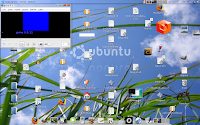 From Ubuntu 7.10, The DistRogue. Labels: avant, compiz, eyecandy, Ubuntu
Xubuntu 7.10: Solid as usual
In Linux-land this week, it was pretty much Ubuntu Gutsy, Ubuntu Gutsy, and Ubuntu 7.10. (And KDE 4 Beta 3.) Nothing else was on Digg, and little else on Tuxmachines, on October 18. As usual, the GNOME side of Ubuntu got all the new features (and the hype that comes with them), but the new additions, Gobuntu and Fluxbuntu, didn't seem to receive as much attention. As is tradition, neither did Xubuntu. But Xubuntu is still a solid system for people with older hardware. It still runs lightweight, GTK-based software and can still (supposedly) run off as little as 64MB of RAM. It still includes most of Ubuntu's features (except Compiz Fusion, which is a big downside), with XFCE as its (capable but underrated) default desktop. It still doesn't run amazingly fast, but it still balances speed and friendliness. The biggest change in this release might seem superficial, but it's a very welcome improvement- a new theme based on the Murrine engine. Add in the usual updates, and you get another solid release. But one thing troubled me as I booted off the live USB. GLXGears only reported 260FPS, and the lowest score I'd seen so far was 800 (for Fedora 8 Test 3). Hmm. The past Ubuntu releases had hovered around 1000. Everything else seemed to run snappily (except games, which had the same bizarre problem)... After looking around a bit, I found the problem. Gutsy is missing a package vital to 3D acceleration, and to fix the problem, just run the command; sudo apt-get install libgl1-mesa-dri and that should fix it. GLXGears jumped to 900FPS. Nothing has changed in the install since last release, so I won't go over it. Well, actually, one thing did: The install froze at 86% when downloading language packs. Just like on Kubuntu. Beta. Wow, since someone already filed a bug on Launchpad, I thought it would be fixed for the final release, but nooo... Not good. Like last time, taking the system offline during the install fixed the problem. From a blank install, I had a working desktop that could do all the things an average user would want to do: work with spreadsheets and documents, browse the Web, play music... The boxed application set is minimalist as usual, but still functional. It uses Totem for all audio playback (may I suggest adding Exaile?), AbiWord for word processing, and Transmission for BitTorrent downloads, along with the usual app set. MP3 codecs aren't boxed, but just like with last release, can be installed with a few clicks when needed. (It even has a wizard! :-) And since it came with ipw3945 drivers, I didn't need to worry about wireless. The thing that really struck me about this release was the artwork. Xubuntu uses the new Murrina-StormCloud theme, along with an XFWM theme from XFCE 4.5-svn. The resulting system looks sleek and runs fast. And the wallpaper is an immense change from past releases, using a new steel-gray color scheme to replace the previous blue. Awesome. Of course, with my custom settings, I didn't get to experience the wallpaper after the install, but the live desktop looked sweet. (In the screenshots, all of the eyecandy can be added with XFWM's built-in compositing, a special font for XFWM titles, and WBar 1.3. No Compiz, Avant, or anything special.)   But Xubuntu's goal isn't to just sit around and look pretty. Even without CFS, scores in Sauerbraten and GLXGears were solid, but it isn't a gamer's OS. (Especially if that "gamer" forgot to order a laptop with decent 3D acceleration... x.X) The lightweight desktop remained responsive with Firefox, GIMP, and a handful of other GTK apps open, but slowed down when I added Azureus into the mix (Java programs are slooow...). This is why I use Deluge for BitTorrent downloads... Xubuntu Gutsy marks another solid release from the Xubuntu team. It's not supposed to be a full Ubuntu release, but a more watered-down version for older machines, which explains why it's missing a few things (coughcoughcoughCompizcoughcoughcough). If you don't like the default package selection, just add more programs in Synaptic. The new artwork, along with the changes common to all versions (new kernel, GIMP moved to 2.4-rc series), make the upgrade worth it. Pros:
-New artwork
-Package upgrades
-GIMP 2.4 (worth it alone)
Cons:
-No new ground broken
-Still not fast enough
-Installation issues
Friendliness: 4.5/5- Almost on par with the main Ubuntu. Performance: 3.5/5- It's supposed to be fast, but it could be a lot faster... Features: 3.5/5- A basic desktop, but a complete one. Packaging: 5/5- Top of its class again. Artwork: 2.5/2.5- Nowhere to go from here, the artwork is superb. Community: 2.5/2.5- The Ubuntu community remains helpful, enormous, and diverse.

Overall: 4.3/5
I'm still trying to decide where to go next. My biggest candidates are Arch and Puppy, but Arch's installer keeps crashing. I had this problem back when I tried 0.72... And Puppy is... well... Puppy Linux. Since I have a new computer, I can't find any uses for it other than gaming, and it doesn't come with libSDL. Too bad, it would make an awesome gaming platform... From Xubuntu 7.10, The DistRogue. PS: A word on that chart. I've made another PHP image generator to make little charts comparing the strengths and weaknesses of various distros. The numbers on the left side represent ease of use, while the right side focuses more on practicality. Here are some more: Mandriva 2008:  openSUSE 10.3:  Wolvix 1.1.0 "Hunter" Edition:  PCLinux OS 2007:  Labels: gaming, Ubuntu, xfce, xubuntu
eLive 1.0: Turning a laptop into a l33t machine
I reviewed eLive 1.0 a while back, saying that it made a great desktop. When I played some Tremulous as part of my review of Xubuntu 7.10 (still coming up), I was disguested by how low my FPS rates were- they dipped below 6FPS on a medium-sized map (Nexus 6). So, I installed eLive with E16 as the desktop and tried it again. This time, the numbers were more like 20-30FPS- playable even with a lot of players in the same room. Now for the shocker- I was using an Intel graphics chip, which is notoriously useless when it comes to gaming. Usually, I tweak xorg.conf to give it 128MB of VRAM from the system memory, but I didn't do it this time. And Tremulous ran playably anyways. Sweet. I guess eLive is my gaming system from now on. From eLive 1.0, The DistRogue. Labels: elive, enlightenment, gaming, tremulous, Ubuntu, xubuntu
Just great...
This is a first. This time, I can't even get to the BIOS screen, or even boot into a live USB. All I get is a message that says "Time-of-day clock stopped." Here's the situation: I'm working with 3 volumes. SDA is my laptop's 80GB internal HD, partitioned as follows: two 10GB ReiserFS partitions for Ubuntu 7.10 (just out today, w00t!) and Mandriva 2008, one 10GB ext3 partition for Linux Mint 3.1, and a 40GB shared /home partition. SDB is a 512MB USB key running SLAX 6.0-rc6 and NimbleX sub-100. Finally, SDC is a 1GB USB key with Puppy Linux 3.01. I downloaded the DVD image to Fedora 8 test 3 and used the bootloader (images/diskboot.img) to load it from SDB1. The install (over Ubuntu) went successfully, except that I accidentally installed GRUB onto SDB. DoH! Three (successful) reboots later, I set up the bootloader to boot my other two OSes. Neither of the options worked. Great... At least Fedora still worked (sans Web connecton). I rebooted into Puppy (on SDC) to fix the problem. I did some browsing, and at some point, it locked up and I had to reboot. At which point my laptop turned magically into a shiny, $600 brick. Great. From Windows XP, A very annoyed DistRogue. (PS: The laptop I'm on has a faulty 'A' key, so I may have missed some 'A's.) Labels: fedora, laptop, Linux, mint, slax, Ubuntu
Ubustu repo merge: You don't care now, but...
One of the less-touted changes for Ubuntu 7.10 is the merge of the Ubuntu Studio repositories into the main ones (hosted by Canonical). This means you'll be able to install entire categories of multimedia software (audio, video, graphics) with a single command (or via Synaptic, as usual). You don't care, right? Okay, let me put it another way. A while back, I stacked up Ubuntu Studio versus dyne:bolic, a rival multimedia distribution. My biggest complaint was that dyne:bolic could run on as little as 64MB of RAM and a Pentium (i586) with satisfactory results, while Ubustu couldn't come close because it used GNOME. Well, say hello to Fluxbuntu, the latest addition to Ubuntu's growing armada of forks. It uses Fluxbox as its desktop environment, and in addition, according to Wikipedia: As well as using the Fluxbox window manager, Fluxbuntu has removed many packages and daemons from Ubuntu which makes it even more lightweight. This remedies one of the reasons why Ubuntu is so slow: it runs a lot of unnecessary software in the background, making it bloated. The opposite is the reason other distros, such as dyne:bolic, leave it in the dust at the benchmarks. What does this have to do with the repository merge? It means that Ubustu can now run on pretty much any base system. If you like KDE more than Ubustu's default GNOME, you can install Ubustu packages over Kubuntu (but please read my previous post first... 0.o) But more to the point, you can now run a complete Ubustu studio over a lighter-weight base by installing Fluxbuntu and adding the Ubustu packages manually. And it's not that hard. Just use these commands: sudo apt-get install ubuntustudio-audio
sudo apt-get install ubuntustudio-video
sudo apt-get install ubuntustudio-graphics Or just install those packages via Synaptic. From Ubuntu 7.10, The DistRogue. Labels: dynebolic, fluxbuntu, gnome, kde, kubuntu, multimedia, Ubuntu, ubustu
Kubuntu: Nothing much has changed in 2 years
If you're reading this on Kubuntu, then I honestly feel sorry for you. It's not that I hate KDE (in fact, I love it, even v3.5), it's just how badly misused it is in Kubuntu. My first experience with Kubuntu dates back almost 2 years, when I tried out the Kubuntu version of Breezy Badger. Now, I've decided to give it another try and see how far it's come in the past 2 years. I downloaded and installed the 7.10 Beta image, keeping in mind that the development branch is less stable than the main one. The installer crashed at 86%. I'm not the only one with this problem, and after asking around on the #ubuntu+1 IRC channel, I learned that taking the live system offline during the install solves the problem. Okay, not Kubuntu's fault. It's not the install that annoyed me so much as what came after it... I booted into a system running KDE, KDE apps, and nothing but KDE as far as the eye can see. This is exactly the problem that a lot of people have with Foresight, the zealous KDE- (or, in Foresight's case, GNOME-) centricism is absolutely crippling. I couldn't find Firefox or Synaptic on there, both of which are included in rival KDE-based distro PCLinuxOS. The artwork has improved drastically since Feisty, but it's still not top-notch. The wallpaper is the biggest step up, using a more blueish color instead of the purple of previous releases. The controls now use a Polyester style, complete with animations. The window decorations, however, are the same old (non-transparent) Crystal windeco as always, and the buttons are still woefully in need of an update. Performance? What performance? GLXGears reported in the 800s out of the box. That would be because the Strigi Desktop Search is turned on by default- not a smart move. Turning it off raised the number to 900, still not quite acceptable. If you absolutely need a KDE-based desktop, my answer is still PCLinuxOS. Pros:-KDE-based :)
Cons:-Slow -Package selection needs refining -Artwork still needs improvement
Friendliness: 4/5- It's still an Ubuntu variant... Performance: 2/5- Not impressive. Features: 3/5- A narrow selection of programs at best. The Kubuntu packagers seem to have their own agenda. Packaging: 3.5/5- Adept? Why not Synaptic? Artwork: 2/2.5- Still needs work, but a step in the right direction. Community: 2.5/2.5- Again, Kubuntu is based on Ubuntu. Overall: 3.4/5- Kubuntu needs some major work done before it can be considered equal to Ubuntu. Labels: kde, kubuntu, Linux, Ubuntu
Jumping ship: PCLinuxOS 2007 vs. Mint 3.0 "Cassandra"
I'm sure I've said it several times before, somewhere: Ubuntu isn't the universal answer. It also has its fair share of things that could definitely be improved if it wants to be a serious competitor to Windows. Basically, it isn't perfect. Of course, Windows and OS X aren't perfect either (or BSD or Haiku or whatever), but there are distributions that would be better suited to a complete Linux newbie than Ubuntu. Arguably two of the best are PCLinuxOS and Mint. I reviewed PCLinuxOS a while back, but it has matured incredibly in only a single release. Among other things, its rank on DistroWatch soared from just barely being in the Top 10 to clinching the #1 spot- and not letting go. Mint isn't so well-known. It's a fork of Ubuntu with a few added programs (such as a custom control center), new artwork, and a redesigned app selection. Background:PCLinuxOS is a fork from Mandriva, giving it a solid, easy-to-use base. Although Mandriva is fast out of the box, PCLinuxOS is even faster. It includes some non-free software, such as MP3 codecs, that other distributions lack. It also advertises a "PCLinuxOS Control Center"- although some quick inspection shows that it's nothing more than a rebranded version of the Mandriva Control Center. Finally, PCLinuxOS includes fresh artwork (which makes it look like Windows XP) and uses Debian's Synaptic package manager- slightly redone to accommodate Mandriva's RPM packaging system. Mint was created from Ubuntu with the original goal of adding non-free software for a more complete out-of-the-box experience. However, as Ubuntu began adding more support for said add-ons, Mint began adding some extras of its own. It includes its own, completely original (and customizable) control center, along with wizards for setting up WiFi, disk partitioning, and desktop settings. It also has its own Kickoff-styled menu called mintMenu, which is useful, stylish, and compact. Of course, it also has its own artwork, along with GNOME, KDE, and Xfce editions, each with its own "Light" edition (with only free software). Finally, in keeping with Ubuntu's tradition of unique names, the developers give each version a female name, with the first letter matching up to the major release number- version 3.0 is named "Cassandra", for instance. Live system/install:I installed both systems (using Mint's GNOME edition) from my trusty 1-gig USB key. PCLinuxOS booted into infinitely cooler artwork, but Mint detected my native screen resolution out of the box, thanks to onboard 915resolution hacks. The installs were both unusually fast- only a couple of minutes- thanks to the miracle of USB 2.0. Performance:Mint booted (from the GRUB menu to the login screen) in an astounding 35 seconds. PCLinuxOS followed with a respectable 43 seconds. I edited both systems to set aside 128MB of physical RAM for graphics acceleration and ran GLXGears from a fresh restart. Mint managed to crank out around 1120 FPS, did well in Tremulous, and reported 34 FPS in my Sauerbraten benchmark- about twice as much as Ubuntu. PCLinuxOS, on the other hand, raised that number to 44FPS, and scored in the 1400s in GLXGears. Useful stuff:
PCLinuxOS's control center is somewhat like the Windows Control Panel: it contains an endless number of options that you can click on to launch wizards to do various things. A lot of these wizards are incomplete, and you have to dive into configuration files in order to do less coarse tweaking. Nontheless, the PCLinuxOS/Mandriva Control Center is an extremely useful and extensive tool for system administration (basic user preferences can be adjusted with the KDE Control Center, also included).
 Mint has its own control center, but its main strength lies in its software selection. Among other things, it includes Java, Envy for installing closed-source NVidia and ATI drivers, amaroK for improved music management, and MPlayer for media playback. I was disappointed not to see Wine anywhere... :'( As with PCLinuxOS, it has its own control center, mintConfig. Although most of the programs in mintConfig are redundant with the also-included GNOME control center, the ones that aren't are good. mintDesktop is a simple, handy tool for setting up your desktop, and mintDisk can be helpful when working with a lot of partitions or removable media. It also has a tool for configuring X11 (relatively) safely, a feature planned for Ubuntu 7.10. mintConfig is also customizable, making it a good replacement for the GNOME control center- but not much else.  Overall, the choice between Mint and PCLinuxOS depends on your desktop preference. If you don't like KDE because it's slow, give PCLinuxOS a shot because of how blindingly fast it is. If you like Ubuntu's ease of use, Mint is worth a look. I'd go with Mint, but only because of a quirk in PCLinuxOS that makes my screen shut off (permanently) if I close it. Mint:Pros:
-Based on Ubuntu
-Runs fast
-Complete out-of-the-box experience
Cons:
-Control center is immature
Friendliness: 4.5/5- The control center helps slightly. Performance: 4/5- Not gaming-quality, but fast enough. Features: 5/5- Boxed app selection is great. Packaging: 4.5/5- Synaptic can't be improved upon very much, although DPKG is pretty slow... Artwork: 2/2.5- Soothing and professional-looking. Community: 2.5/2.5- Almost 100% Ubuntu-compatible means lots of support. Overall: 4.5/5- A great up-and-coming distribution, only expect it to improve as the control center matures.
PCLinuxOS:
Pros:
-Runs obscenely fast
-Useful, if unoriginal control center
Cons:
-May need some extra programs installed
-Inspiron E1505N users beware!
Friendliness: 5/5- The PCLOSCC is the killer touch here. Performance: 4.5/5- Beyond PCLinuxOS, you get into ArchSlackToo speeds. Features: 4/5- Could use a little work here... Packaging: 5/5- See above- but RPM is faster than DPKG. Artwork: 2.5/2.5- The 2007 release is famous for its artwork. Community: 2/2.5- The community is new, but growing. Overall: 4.6/5- If you're a newbie that needs a really fast system that helps you with everything you need, then look into PCLinuxOS. I'm waiting for my Sabayon 3.4e DVD to get here. Then, it's time for another long-overdue review. From Mint 3.0, The DistRogue. ***UPDATE:*** It is possible to make PCLinuxOS recognize your native screen resolution. In PCC, go to the Hardware tab, then click "Change Screen Resolution" to install 915resolution. Then, go to "Change Monitor" and select the appropriate resolution. Finally, change the resolution under "Configure Graphical Server". I'm still working on the fix for the screen suddenly shutting off. Labels: comparisons, Linux, mint, pclinuxos, Reviews, Ubuntu
Full-length review: Ubuntu, Xubuntu and Ubuntu Studio 7.04, and dyne:bolic 2.4.2
Well, the promised uber-review is finally here. With the release of Ubuntu 7.04 (aka "Feisty Fawn"), a new fork of Ubuntu, named " Ubuntu Studio", was released, to go along with Kubuntu ("LinuKs for KHumans", released with 5.04), Edubuntu ("Linux for Young Humans", 5.10), and Xubuntu ("Linux for Gamers and Humans with Old Hardware", 6.06 LTS). It focuses on content creation, containing numerous tools for audio, video, and picture manipulation and creation. Of course, there are numerous other unofficial forks, not to mention ideas (both serious and non-serious). There's an Ubuntu fork for everyone! Armed with a working wireless connection, I decided to put Ubuntu, Xubuntu, and Ubuntu Studio through their paces, and compare Ubuntu Studio (aka "Ubustu") with dyne:bolic, a rival content-creation OS. == Ubuntu and Xubuntu == For starters, I repartitioned the disk setup that came with my new laptop and installed Xubuntu over it. Since Ubuntu was installed already, that might seem like a dumb move. Well, I needed to repartition the disk so that the computer had a 40GB shared /home partition (need somewhere to store my music collection...) and various other partitions for other OSes. A 2-gig swap partition seemed like a good idea at the time, but proved invaluable while gaming. (Nexuiz needs at least 512MB of RAM to itself, nothing a simple "sudo swapon /dev/sda5" can't fix.) Also, I had a taste of the new installer. Other than completely redesigning the partitioner, the major change is the new "Settings Migration Wizard", which swipes settings and documents (!) from other OSes (like Windows) and changes them so that they'll work on your newly-installed system. Oddly enough, my Ubuntu partition didn't show up on the wizard, even though it did on other test systems... I then installed Automatix and used it to get some codecs, media players, and other things. Automatix is frowned upon by the Ubuntu officials, but it's an easy way to get a working system in minutes. I also added some games- from penguin classics like TuxKart and PPRacer to full-blown shooters like Tremulous and Nexuiz. All with a few apt-gets and a lot of patience- the local ISP was having issues (is a ping of 1500 to Google normal for a DSL user?) Performance (as always) was a huge problem. Compiz and Beryl (as of Feisty, Compiz is installed by default) ran flawlessly (okay, nearly flawlessly...), but because of crappy on-chip 3D acceleration (and bad drivers from Intel), I scored less than 25FPS in ThinkTanks, a record low, and Nexuiz was barely playable with all the effects turned off. (With the defaults, it was pretty choppy...) Sauerbraten refused to run, and I'm not the only one having this issue- it looks like something's up with Intel chips. BZFlag was just barely playable online with a ton of effects disabled and 800x600 resolution, but in solo, it worked great with the defaults. At least SuperTux Mi1.9 worked, and Tremulous cranked out 60+FPS... (And the problem isn't my hardware. BZFlag worked fine with Sabayon.) Ubuntu did have some other perks. A new disk-usage analyzer not only looks cooler, but makes it easier to find files and folders that take up disk space. A restricted-drivers manager allows unsupported drivers to be turned on and off. A simpler networking manager allowed for 2-click wireless connectivity from a blank desktop. A codec installer takes care of a longtime complaint of Ubuntu users- easy access to commonly needed multimedia codecs. And Compiz was integrated, with easy-to-use controls. Ubuntu has been, is, and, judging by the plans for the next release ("Gutsy Gibbon"), will be a great distribution for a while. I once recommended Mandriva to a friend who was drooling (okay, not exactly drooling) over Compiz, but with Feisty, that's not even an excuse anymore (and it's about time!). Compiz was considered for Edgy and almost dropped for Feisty. According to rumors, Gusty will include Beryl, and maybe even Metisse. Friendliness: 5/5- Other distros, such as Linspire and PCLinuxOS, are still friendly, but Ubuntu 7.04 set an even higher standard. The new changes are worth it. Performance: 3/5- Xubuntu is much better in this regard. Ubuntu is a somewhat bloated OS, running various Apt-related processes in the background, alongside GNOME. Using XFCE helps. Features: 4/5- Still not a complete feature set, but the new additions help you get there. So does Automatix. Packaging: 4.5/5- There's nowhere to go from here except to use openSUSE's YaST2 packager, and only because of its superior filtering options. Overall: 4.13/5- PCLinuxOS might be the top-dog distro for now, but Ubuntu is still the first choice for any newbie. But wait! Don't hit that "Back" button yet! == Ubuntu Studio vs. dyne:bolic ==To get Ubuntu Studio working, I typed in "sudo apt-get install ubuntustudio-audio ubuntustudio-video" from the command line and waited for the download. Ubuntu Studio, being an official variant of Ubuntu, includes metapackages that can be installed from Synaptic or apt-get. These packages install all the necessary programs for a working Ubustu desktop. dyne:bolic, on the other hand, is a separate distribution altogether. Put together by Jaromil the Rasta Coder, the inventor of the forkbomb (a code that shuts down a computer: :(){ :|:& }:; ), dyne:bolic fits on a CD-RW and packs 650MB of audio, video, text and image-manipulation/creation programs- all licensed under the GNU GPL. (Translation: The CD is 100% open-source.) It also happens to be optimized for a Pentium or later CPU, and claims the ability to run on as little as 64MB of RAM, thanks to an XFCE desktop. The killer: It's a Live CD, but can be installed nondestructively. Ubuntu Studio, not to be outdone that easily, has two main edges. The biggest one is the sheer range of available programs. The image is 100MB too large to fit on a CD (if that's how you choose to install it), but it has many more programs than dyne:bolic. I counted 67 programs under my "Multimedia" menu after the install (of course, I also installed some programs of my own, such as XFMedia). There's also a handy launcher to give you an instant, customized recording studio. The other important part of Ubustu is the kernel. Ubuntu Studio's kernel is of the low-latency flavor- It gives 95% of the CPU power to the currently running program. This is perfect for audio, where robbed CPU power disturbs audio playback, and gaming, where it can cause lag- and in fast-paced games like Quake, a little lag can mean an easy frag. As far as performance, though, dyne:bolic beat Ubustu by a considerable margin. i586 optimization, combined with a lightweight desktop and little-to-no background bloat, was much more powerful than just tacking on a low-latency kernel. Also, Ubustu's enormous app selection worked against it. The distributed copy of Audacity was compiled without JACK support, and the JACK drivers for amSynth and Hydrogen didn't work. As a result, some programs needed JACK to be running to work, while the major ones needed it to be disabled. Having QJackCtl handy only helped slightly. Dyne:bolic's selection of programs was more polished and interoperable. Artwork on both distributions was great. Ubustu included a custom black-and-blue theme that looked sleek and polished. Dyne:bolic included calm, subtly-themed wallpaper that may well have been made using the CD itself. A clean, subtle XFCE theme and an out-of-the-way panel provided a serene, uncluttered workspace. Both of these distributions are worth a try if you're considering a distro for content creation. Ubuntu Studio will give multimedia enthusiasts all the tools they need, while dyne:bolic is an indispensable tool for people stuck on old computers. Ubuntu Studio 7.04:
Friendliness: 5/5- See notes for Ubuntu 7.04. Performance: 2.5/5- In multimedia creation, low performance can have a serious effect on sound quality, even with a low-latency kernel. Features: 5/5- It's a complete studio. Packaging: 4.5/5- See Ubuntu 7.04. Overall: 4.25/5.
dyne:bolic 2.4.2:Friendliness: 4/5- Takes the pain out of having to use a Live CD. Performance: 4.5/5- A lightweight, fast CD. Features: 3.5/5- Not exactly a paltry feature set, but clearly not ultra-complete. Packaging: 4/5- You can download modules from the site, and they're relatively easy to use- except that they require a hard disk or USB drive. (But where else would you store your files?) Overall: 4/5.What's next? SAM Linux 2007. Vector didn't make it past the install. (But Canada still has User Friendly and Billy Talent, eh?) From Xubuntu Linux 7.04, The DistRogue. Labels: dynebolic, studio, Ubuntu, ubustu, xubuntu
It's here.
The laptop got here today. I've already repartitioned the hard-disk setup. 40GB for /home should be enough... Next up: A review of Ubuntu, Xubuntu, and Ubuntu Studio 7.04. PCLinuxOS follows that, and after that, it's time for a little-known Slackware derivative from Canada: Vector Linux. (It's Canadian, and they seem to do everything more sensibly than us Yanks, so you know it'll be good...) So far, it looks suspiciously like Zenwalk. They're both XFCE-using Slackware derivatives aimed at novices, they both come from French-speaking countries, they both have separate Live/Install CDs... Still need to install Ubustu over Ubuntu and Xubuntu and add an SMP kernel, though... From Xubuntu Feisty, The DistRogue. Labels: future, pclinuxos, Reviews, shameless, slackware, studio, teasers, Ubuntu, ubustu, vector, xubuntu
Time to upgrade GNU/Studios.
No doubt you've seen the hype about Dell's new Ubuntu PCs. I recently ordered one (with nothing out of the ordinary added), and here's what you can get on a laptop for $600: -Dual-core Pentium CPU @ 1.73GHz -512MB RAM @ 533MHz -Intel GMA950 graphics accelerator -Intel Pro/Wireless 3945ABG wireless NIC (which works well with Linux) -80GB HD @ 5400RPM Check it out yourself. I'll be posting a review to see how well Xubuntu runs on it when I get it, as well as that Ubuntu Studio Edition vs. dyne:bolic deathmatch you've all been waiting for (in my dreams)... Not to mention a review of SAM Linux 2007- about time! Expect a month delay (0.o) but I'm serious this time. Labels: dell, dynebolic, sam, Ubuntu, ubustu, xubuntu
Linux Lite: Small distros for old machines
One of the reasons why one would get Linux is to make use of old hardware. Windows Vista, with all the DRMs built in, is bloated beyond belief, especially with the shiny "Aero" effects. Pretty but useless, like Paris Hilton... Anyways, people who do this had better check the system requirements before they pick a distribution. Ubuntu is the obvious choice for most people, but when that person is stuck on a 400MHz Pentium II laptop with 128MB of RAM, it might not be such a good idea. So, here are some small distributions that get the job done on old systems, too. They might also be good for gamers who want to eke every possible bit of performance out of their machine. -Ubuntu Lite and Fluxbuntu: Variants on Ubuntu that use IceWM and Fluxbox, respectively, as their desktops. Although these are lighter than their GNOME counterpart, you can still do better- they come with bloated services that slow the system down. - Damn Small Linux: "50 megabytes of penguin power", a business-card-sized CD that runs Fluxbox and a collection of tiny apps. With a 2.4-series kernel, hardware compatibility will be limited, but it works fine for gaming. - Zenwalk: Slackware is incredibly efficient, but hard to install. Zenwalk is a friendlier distribution based on Slackware, but using XFCE, which also runs faster (but isn't too hard to use). - Absolute Linux: Absolute is a lightweight desktop (it boasts an idle RAM usage of only 26MB with certain services disabled), but the CD comes with an enormous number of programs. It uses IceWM, and is based on Slackware. - DeLi (Desktop Lite): A small, independent distribution. The CD image is only about 130MB, and it is designed to run on really old machines- it can run on 8MB of RAM. Also uses IceWM. - PCLinuxOS and SAM Linux: Although they're not as small as the previously-mentioned distros, these forks of Mandriva run superbly on relatively old machines (my test system, in case I need to remind anyone, is an 800MHz Celeron with in i810 graphics chipset and 320MB of RAM). PCLinuxOS uses KDE, and runs faster than Ubuntu. SAM uses XFCE, and has a great, OSX-like launcher. PCLinuxOS is currently the top distribution according to DistroWatch (surprise!). When looking for a fast system, there are three things to keep in mind: - The desktop. Most lightweight distributions use either XFCE (gaming systems) or IceWM (legacy systems). IceWM is *tiny*, but XFCE is a complete environment, with its own apps and libraries.
- Bloatedness. Distros like Ubuntu or openSUSE (and especially Fedora) have a lot of services running in the background, and they slow the whole thing down. Distros that follow a strict KISS (Keep It Simple, Stupid) strategy (Slackware and the like) don't have all this bloat slowing them down.
- Optimizations. Distros like PCLinuxOS are optimized for an i586 (Pentium) or later CPU. This means they won't run on a 486 or later, but they'll run extra-fast everywhere else. Arch is i686-optimized (Pentium II), the highest level, and follows KISS (which has nothing to do with Gene Simmons). Gentoo and other source-based distros let you choose how you want it optimized, but are notoriously hard to install.
Finally, as a general consideration for making your system even lighter (and snappier), make sure you're not loading any more libraries than you need to. Here's an example: A normal system: -GIMP (uses GTK) -Firefox (uses libFirefox) -amaroK (uses Qt, KHTML) -Nautilus (uses GTK, libGNOME) -arK (uses Qt) -Tomboy (uses GTK) ...You get the idea. The apps on this system either load too many libraries or rely on their own. A good system uses a couple libraries a lot. Optimized system: - GIMP (uses GTK) -Epiphany (uses GTK, GTKHTML) - Exaile (uses GTK) -Thunar (uses GTK, Exo) -XArchiver (uses GTK, Exo) -Orage (uses GTK, Exo) Three libraries are shared between 6 programs, which would otherwise be packing their own libraries. From SAM Linux 2007, The DistRogue. Labels: Linux, lite, pclinuxos, Rants, sam, Ubuntu
dyne:bolic vs. Ubuntu Studio
Ubuntu Studio has published a list of programs that it will include. dyne:bolic has the major ones, such as Blender or Audacity, but Ubuntu SE has a number of programs that it lacks, and that could make a major difference. But maybe it's just the fact that dyne:bolic still hasn't published a complete package list of their own... And besides, dyne:bolic is more than complete for most users. By the way, speaking of stuff that comes with both distributions, check out ZynAddSubFX. Labels: dynebolic, gnu, studio, Ubuntu
Coming soon...
In addition to a review of Xubuntu 7.04 "Feisty Fawn", I will eventually (as in very soon) be doing a content-creation shootout between two distributions designed for creative uses, dyne:bolic and Ubuntu Studio Edition. These two distros have the same goal: to provide tools to let a person's creativity loose on the world. These include audio-editing tools like Audacity and Ardour, graphics tools like The GIMP, and even video editors like Kino, all available for free. But there are some key differences: - Desktop choice. Ubuntu SE uses, as far as I can tell, the default GNOME that Ubuntu uses. dyne:bolic uses XFCE, an uncommon, but favorable, choice. - Performance. Multimedia editing of any kind demands a half-decent system. I've learned this the hard way. Ubuntu recommends 256MB of RAM for operation (for GNOME), while dyne:bolic claims that it can run on as little as 64MB. (This is even more impressive because Xubuntu recommends 128MB of RAM, and, like dyne:bolic, it uses XFCE.) In addition, Ubuntu can run a 386, whereas dyne:bolic needs a Pentium or K5-class CPU or later, but this is actually an advantage for it. Ya see, nobody really uses a 386 for multimedia production anymore, and Ubuntu would probably run obscenely slowly on a 386 anyways. However, optimizing a system for a Pentium (i586) allows it to run faster. The last i586-optimized distribution I tried, SAM Linux, was roughly 150% faster than Ubuntu. - GNU-ness. Ubuntu isn't a completely open-source distribution. (That would be gNuiSance.) dyne:bolic is. It's also a Live CD, whereas Ubuntu Studio doesn't have a live version (and a text install, like Breezy). - dyne:bolic has a cooler name. This is always a big criterion. Not to mention Jaromil "The Rasta Coder", the inventor of dyne.org and the forkbomb... :(){ :|:& };: From Xubuntu 7.04, The DistRogue. Labels: dynebolic, Live, shameless, teasers, Ubuntu
The image is downloaded, the MD5s are matched...
One review for Xubuntu 7.04 coming right up- as soon as I get the review for openSUSE out. As for Mandriva, well... I've been having boot problems, but I'll try to get some Metisse screenshots ASAP. Brace for some major reviewage. And if you haven't heard the news by now, where have you been? While you were gone, Ubuntu Feisty came out right on schedule, with no delays! From Xubuntu 7.04, The DistRogue. Labels: mandriva, opensuse, Ubuntu, xubuntu
2 reviews queued, maybe 3...
In case you haven't heard the news, Mandriva 2007.1 Spring Edition came out today! :) Featuring... do I need to go over the list again? Metisse inside every version, a faster URPMI, updated packages, new artwork (everywhere)... And as if that's not enough, in spite of the recent delays, Ubuntu still says that version 7.04 will be out tomorrow. Exciting times ahead... Labels: mandriva, opensuse, Ubuntu
I see a lizard in my future
The review for openSUSE is still coming, but with a startling new development. A classic issue with my laptop has been getting my Atheros-based Belkin F5D7010 wireless card to work. I've found that after kernel 2.6.17, Linux's built-in madwifi driver fails to work, so I use 2.6.15 all the time. There was a solution on the openSUSE wiki, and it was something I hadn't tried before. When I installed the driver and rebooted, lights came on under the card that I didn't even know existed. Scary. Even cooler, internet connectivity worked with a 2.6.17 kernel! This is awesome, as it will allow me to review a ton more distributions than I have been. Who knows, I might even install openSUSE on my laptop. I've heard it's a good mobile distro. From Ubuntu 6.10, with kernel 2.6.17, The DistRogue. (PS: Ubuntu Feisty might not have an RC out yet, but they're still planning to ship it on schedule. Can you believe these guys?) Labels: atheros, belkin, laptop, mobile, ndiswrapper, opensuse, Ubuntu, wifi, wireless
|


